Data Recorder
The Data Recorder stores data asynchronously for review and therefore does not slow it down.
For data security purposes, it is recommended to always store the data on the local memory of the controller. In connection with the Daten Transfer Modul, the data can be safely moved afterwards.
Information: Make sure that the data recorder module is loaded.
Warning: It is not guaranteed that the data is already stored at the end of the test.
Warning: Saving directly to network drives may result in data loss if the connection is lost.
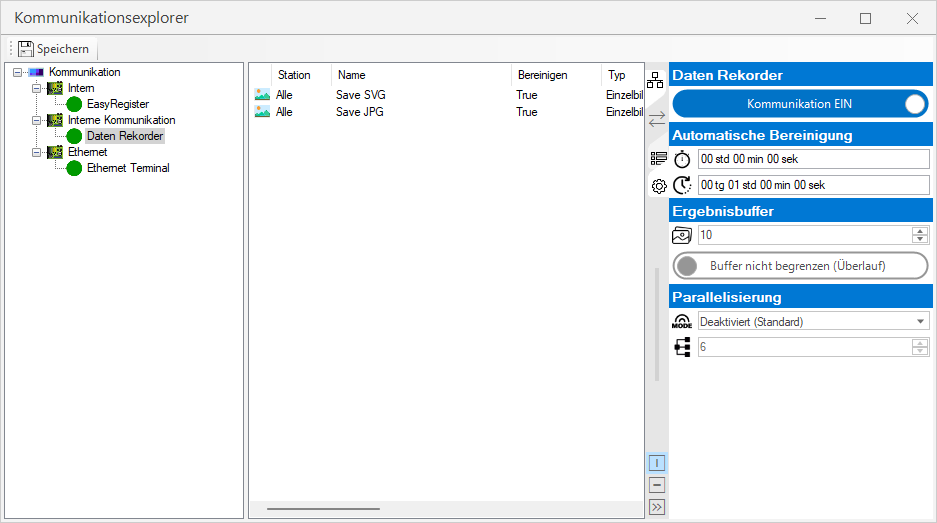
Settings
 Data Recorder
| Communication | OFF: Module is disabled ON: Module is enabled |
Automatic cleanup

|
Start time for automatic cleanup. (If active). For more information, see automatic cleanup |

|
Time span between the individual cleanup processes. After the time span has elapsed, a new cleanup is triggered. time = start time + (time span * n) |
Result buffer

|
Maximum size of the buffer for unprocessed results. Each new result is inserted into the buffer and processed from the buffer |
| Do not limit the buffer (overflow): The maximum result buffer may be exceeded. A warning is generated in the event of an overflow. The memory consumption of the application can increase uncontrollably as a result. Limit buffer (discard results): The maximum buffer must not be exceeded. If the buffer is full, no more new results are inserted and are lost (an error is generated). |
Parallelization

|
Processing mode: Sequential or parallel - Deactivated (default): All results are retrieved individually from the buffer and each storage task is processed sequentially. - One result Parallelized: All results are fetched individually from the buffer and all memory tasks are processed in parallel - All results via Task Scheduler: Results are fetched in parallel according to the number of tasks in the Task Scheduler and all memory tasks are processed sequentially for each result |

|
Number of tasks in the Task Scheduler (for 'All results via Task Scheduler' mode) |
You can find more information at Parallelization.
Operation
Communication Explorer
In the middle part of the communication explorer, you can now add individual blocks by right-clicking, or edit or delete existing ones.
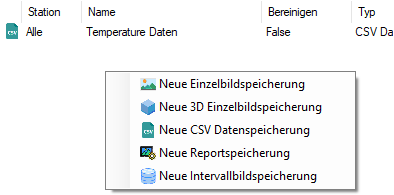
| Block | Description | |
|---|---|---|

|
New single image recording | Saves a single 2D image with or without overlays. |

|
New 3D image recording | Saves a rendered 3D image. |

|
New CSV recording | Saves data to a CSV file. |

|
New JSON data recording | Saves data to a JSON file. |

|
New Report recording | Saves an EasySightPro® Reporting data set. |

|
New interval image recording | Stored an image stream in frames periodically. This function is no longer developed. |
Dockable status window
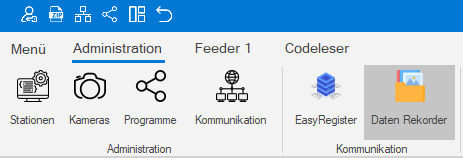
You can access the monitoring and status check via the Administration menu.
The window provides an overview of the current status of the module and the individual memory tasks:
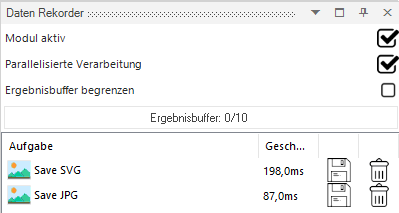
The following information is displayed for each task:
-
Duration of the last execution in milliseconds
-
Storage currently active: Yes/No via icon
-
Memory cleanup currently active: Yes/No via icon
Parallelization
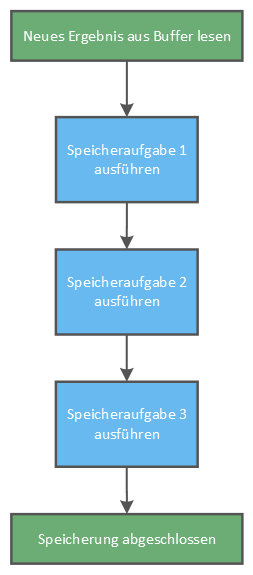
Deactivated (default)
All results are retrieved individually from the buffer and each memory task is processed sequentially.
This mode is very reliable, as one result is saved after the other. Collisions due to simultaneous saving to a file are avoided.
The throughput in this mode is limited and an increased result rate can lead to the buffer filling up.
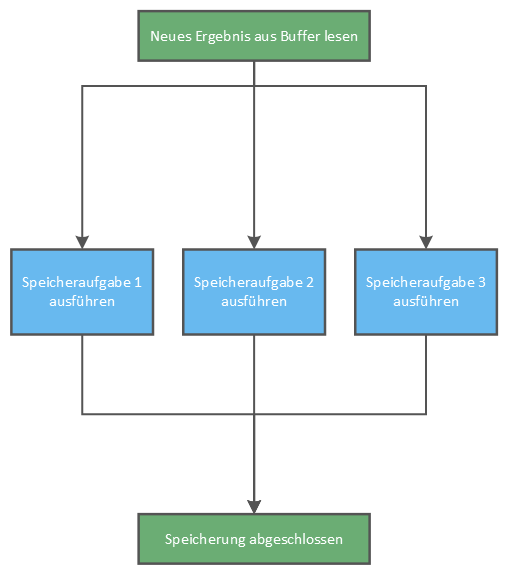
One result parallelized
All results are fetched individually from the buffer and all memory tasks are processed in parallel.
This mode provides speed advantages when several memory tasks are executed per result. The result is transferred to all memory tasks simultaneously.
Important: It is essential to ensure that two tasks do not write to the same file in parallel. This leads to a conflict!
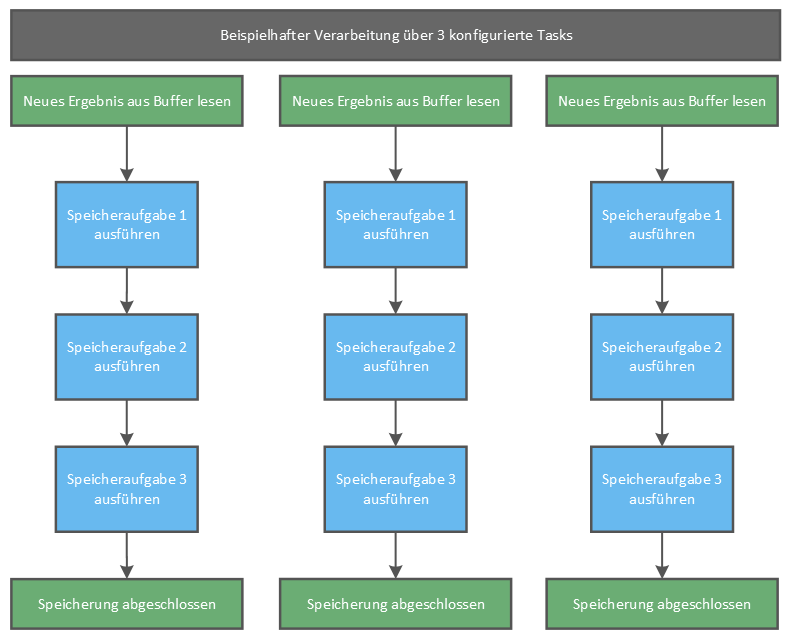
All results about Task Scheduler
Results are collected in parallel according to the number of tasks in the task scheduler and all storage tasks are processed sequentially for each result..
This mode offers speed advantages if only a few memory tasks are executed or a high result rate is expected. The degree of parallelization can be controlled via the 'Number of tasks in the Task Scheduler' input.
Important: It is essential to ensure that two tasks do not write to the same file (CSV data storage,....) at the same time. This leads to a conflict!
Automatic cleanup
The module's automatic cleanup ensures that data that is no longer needed is automatically deleted.
Each recording block has its own cleanup routine and strategy. This routine is executed when EasySightPro®is restarted and thereafter at the configured time.
Information: The static part of the base folder is used for cleanup.
Example configuration: D:\Image Data\{SLOTID}_{SLOTNAME}\{PROGRAMNUMBER}_{PROGRAMNAME}
Static is the left part of the path without dynamic tags (marked with { })
Warning: If the static part of the base folder of several recording blocks overlaps, unwanted deletion of data may occur. Check this with care.
Information: At the end of the cleanup, empty folders and subfolders are removed automatically.
Clean by age of data
In this case, all data in the D:\Image Data\ folder (including subfolders) older than the time period set in the block will be deleted.
Clean by number of files
In this case, oldest data of the D:\Image Data\ folder (including subfolders) will be deleted until the desired maximum number of data is reached.
Clean up with minimum free memory
In this case, oldest data of the D:\Image Data\ folder (including subfolders) will be deleted until the minimum free memory is exceeded again.